Agent Configuration
Configure your CastellanAI agents to optimize security monitoring for your environment.
Overview
CastellanAI agents are designed to work optimally out of the box. When you install an agent using an enrollment token from the Portal, all necessary settings are automatically configured.
Most users never need to modify agent settings. Agents are automatically configured during enrollment and receive updates from the Portal.
Automatic Configuration
When an agent enrolls with your account, it automatically receives:
| Setting | What It Does |
|---|---|
| Customer ID | Links the agent to your account |
| Worker URL | Connects to your secure CastellanAI backend |
| API Key | Authenticates the agent |
| Smart Filtering | Optimizes data transmission (enabled by default) |
Viewing Your Agents
To view your enrolled agents:
- Log in to your Customer Portal
- Click Agents in the header navigation
- View your agents with their status, platform, and activity
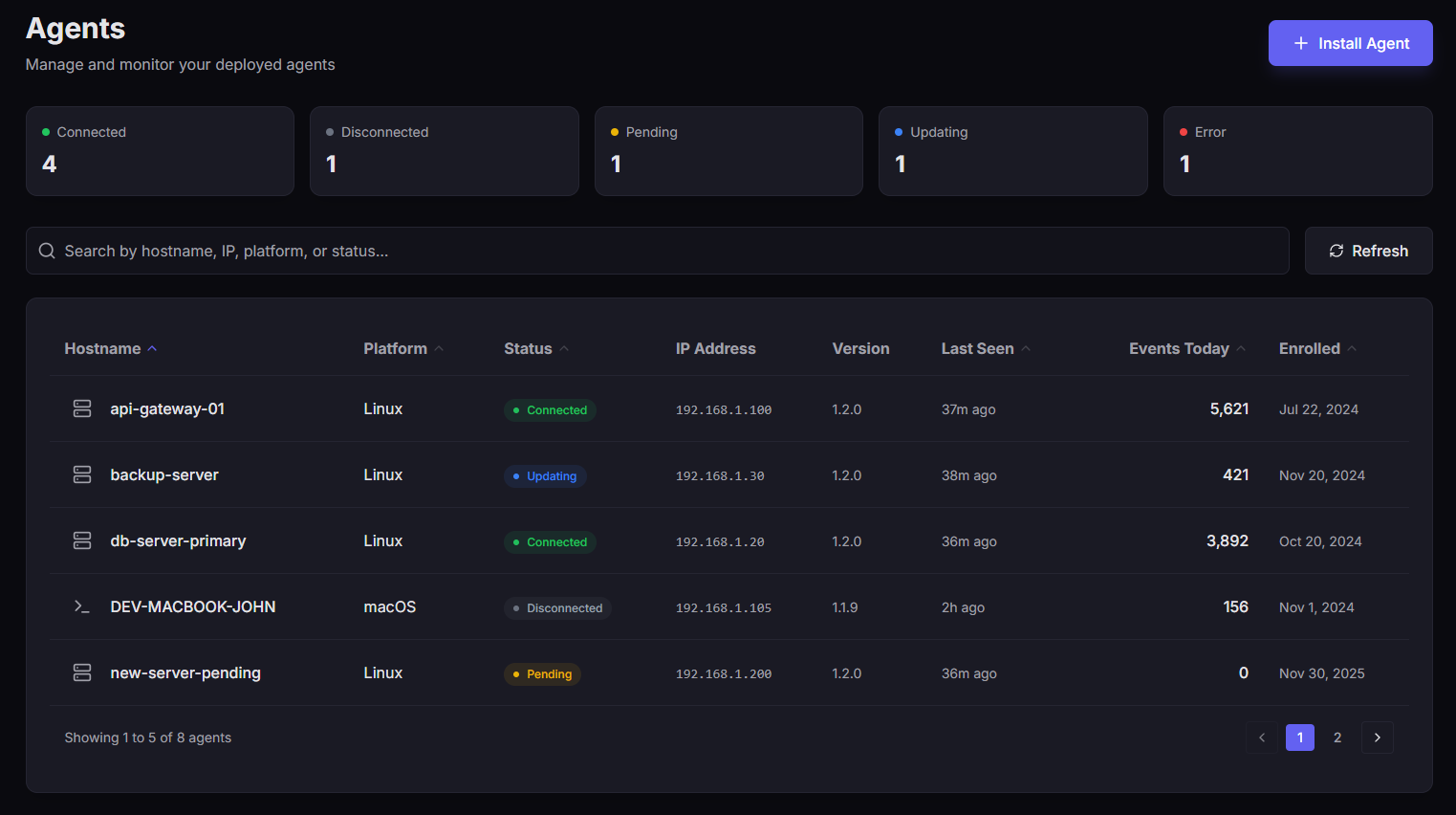 The Agents page showing enrolled agents with status, platform, last seen, and events processed.
Agent Information
| Column | Description |
|---|---|
| Hostname | The machine name where the agent is installed |
| Platform | Windows, Linux, or macOS |
| Status | Connected, Disconnected, Pending, Updating, or Error |
| IP Address | The agent's network address |
| Version | Installed agent version |
| Last Seen | When the agent last reported |
| Events Today | Number of security events processed |
Smart Filtering
Smart Filtering is CastellanAI's intelligent event prioritization system that reduces network traffic by 95-98% while ensuring critical threats are detected immediately.
Events are scored locally on the agent and prioritized based on security relevance. This dramatically reduces bandwidth while ensuring nothing critical is missed.
Priority Levels
| Priority | Score Threshold | What Happens |
|---|---|---|
| Critical | ≥90 | Sent immediately to dashboard |
| High | ≥70 | Batched and sent every few seconds |
| Medium | ≥40 | Analyzed locally on the agent |
| Low | Under 40 | Filtered out (routine noise) |
Smart Filtering is enabled by default and requires no configuration.
Event Collection
Agents collect events from multiple sources depending on the operating system:
- Windows
- Linux
- macOS
Windows Event Sources
| Event Log | Events Collected |
|---|---|
| Security | Authentication, access control, policy changes |
| System | Service changes, driver issues, hardware events |
| Application | Application errors, warnings, crashes |
| PowerShell | Script execution, command history |
Linux Event Sources
| Log Source | Events Collected |
|---|---|
| Syslog | System messages, daemon activity |
| Auth log | Login attempts, sudo usage, SSH connections |
| Kernel | Kernel messages, security modules |
macOS Event Sources
| Log Source | Events Collected |
|---|---|
| Unified Logging | System and application events |
| Security Events | Authentication, authorization |
The agent requires Full Disk Access to read these logs. See macOS Installation for setup instructions.
Advanced Configuration
Manual configuration is only recommended for advanced deployments. Most users should rely on automatic enrollment configuration.
For special deployment scenarios, agents can be configured through a local configuration file.
Configuration File Location
- Windows
- Linux
- macOS
C:\ProgramData\CastellanAI\appsettings.json
/etc/castellanai/appsettings.json
/Library/Application Support/CastellanAI/appsettings.json
Full Configuration Reference
{
  "Agent": {
    "HeartbeatInterval": 30,
    "ReconnectInterval": 5,
    "EventCollection": {
      "CollectSecurity": true,
      "CollectSystem": true,
      "CollectApplication": true,
      "CollectPowerShell": true,
      "MaxEventsPerSecond": 1000,
      "BufferSize": 10000
    },
    "SmartFiltering": {
      "Enabled": true,
      "DataReductionTarget": 95,
      "CriticalThreshold": 90,
      "HighThreshold": 70,
      "MediumThreshold": 40
    }
  }
}
Setting Descriptions
⏱️ Connection Settings
| Setting | Default | Description |
|---|---|---|
HeartbeatInterval | 30 | Seconds between agent heartbeats |
ReconnectInterval | 5 | Seconds to wait before reconnection attempts |
📊 Event Collection Settings
| Setting | Default | Description |
|---|---|---|
CollectSecurity | true | Monitor Security event log |
CollectSystem | true | Monitor System event log |
CollectApplication | true | Monitor Application event log |
CollectPowerShell | true | Monitor PowerShell event log |
MaxEventsPerSecond | 1000 | Rate limit for event processing |
BufferSize | 10000 | Maximum events to buffer locally |
🎯 Smart Filtering Settings
| Setting | Default | Description |
|---|---|---|
SmartFiltering.Enabled | true | Enable intelligent event filtering |
DataReductionTarget | 95 | Target percentage of data reduction |
CriticalThreshold | 90 | Score threshold for immediate send |
HighThreshold | 70 | Score threshold for batched send |
MediumThreshold | 40 | Score threshold for local analysis |
Recommended Settings by Environment
| Environment | Recommendation |
|---|---|
| Production Servers | Use defaults (all channels monitored, Smart Filtering enabled) |
| Workstations | Use defaults (optimal for end-user devices) |
| Development | Consider reducing MaxEventsPerSecond to minimize noise |
| High-Security | Use defaults (Smart Filtering ensures critical events are prioritized) |
Troubleshooting
❌ Agent Not Appearing in Portal
- Verify the agent service is running
- Check network connectivity to CastellanAI servers
- Ensure the enrollment token was valid and not expired
- Review agent logs for error messages
🔌 Agent Showing Disconnected
- Check if the agent service is running on the endpoint
- Verify network connectivity (firewalls, proxies)
- Restart the agent service if needed
📝 Events Not Being Collected
- Verify the event log channels are enabled in the configuration
- Check that the agent has permission to read event logs
- Review
MaxEventsPerSecondif experiencing high volume
What's Next?
| Guide | Description |
|---|---|
| Agent Health Monitoring | Monitor your agents' status and performance |
| Agent Troubleshooting | Resolve common agent issues |